Table workspace
From a table image to an editable spreadsheet
Select a table in a screenshot or PDF page, correct its cells, and download an Excel workbook with numbers you can calculate.
- 1Select a table
- 2Review cells
- 3Copy or download
Loading local draft…
Automatically saved in this browser. You can restore or clear the workbook.
Bring the table into focus
Drop an image or PDF here. Select one table or a group of tables on a single page.
PNG, JPG, WEBP, BMP or one PDF page · up to 20 MB
You can also paste a screenshot.
A short path from image to spreadsheet
- 01
Select what matters
Upload or paste an image. For PDFs, choose a page and draw a rectangle around the table. The original file stays unchanged.
- 02
Check rows and column types
Compare with the selected source, correct cells, adjust rows and columns, and mark identifier columns as Text.
- 03
Work with the result
Copy the current table or download all tables as XLSX. Open it in Excel, LibreOffice or another spreadsheet and calculate with numeric cells.
Synthetic example
Try an inventory table
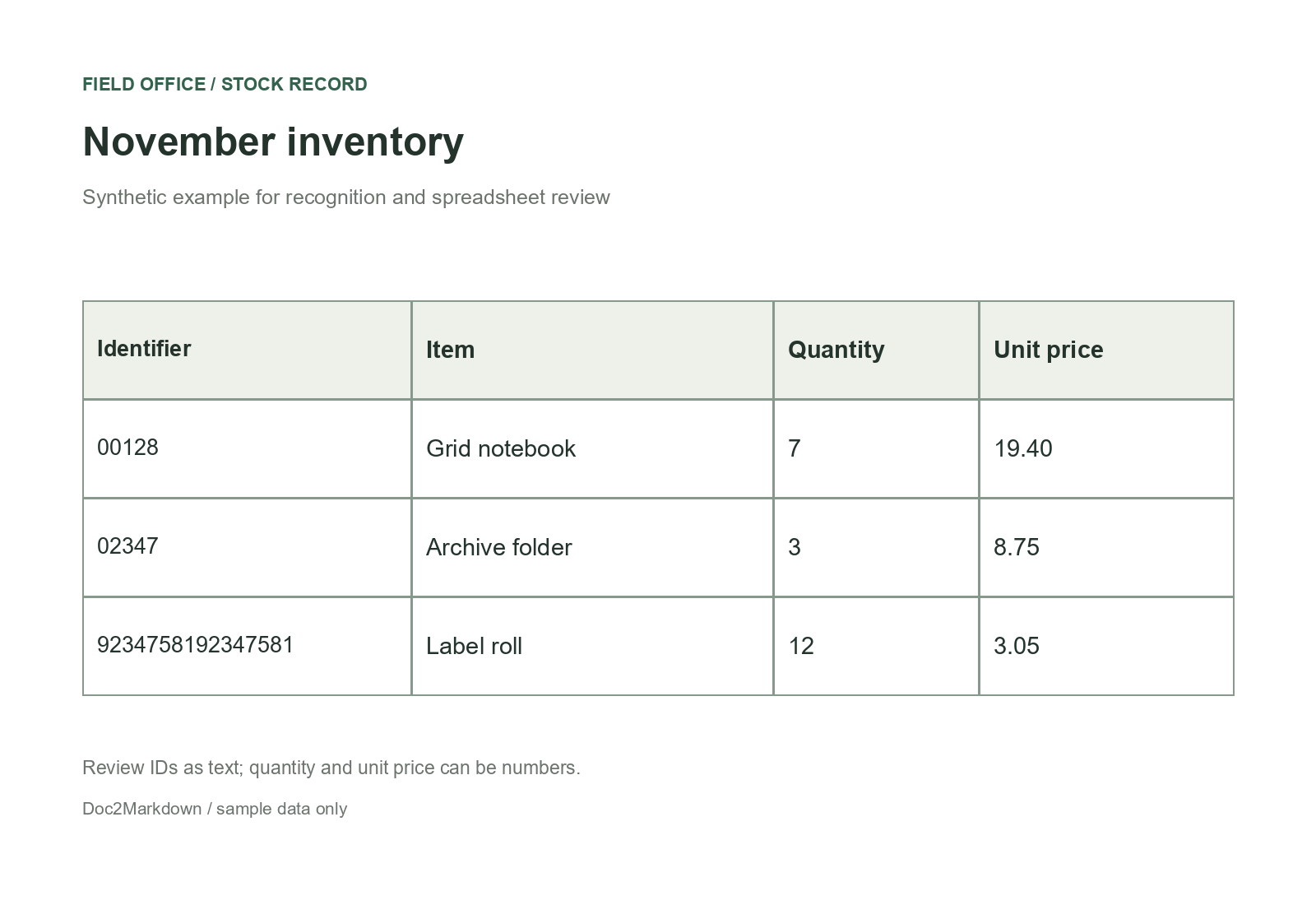
This example contains quantities, decimal prices, leading-zero identifiers and a long identifier. Compare the recognized result with the image and the example workbook.